What We'll Cover
1. What FFB Clipping Actually Is
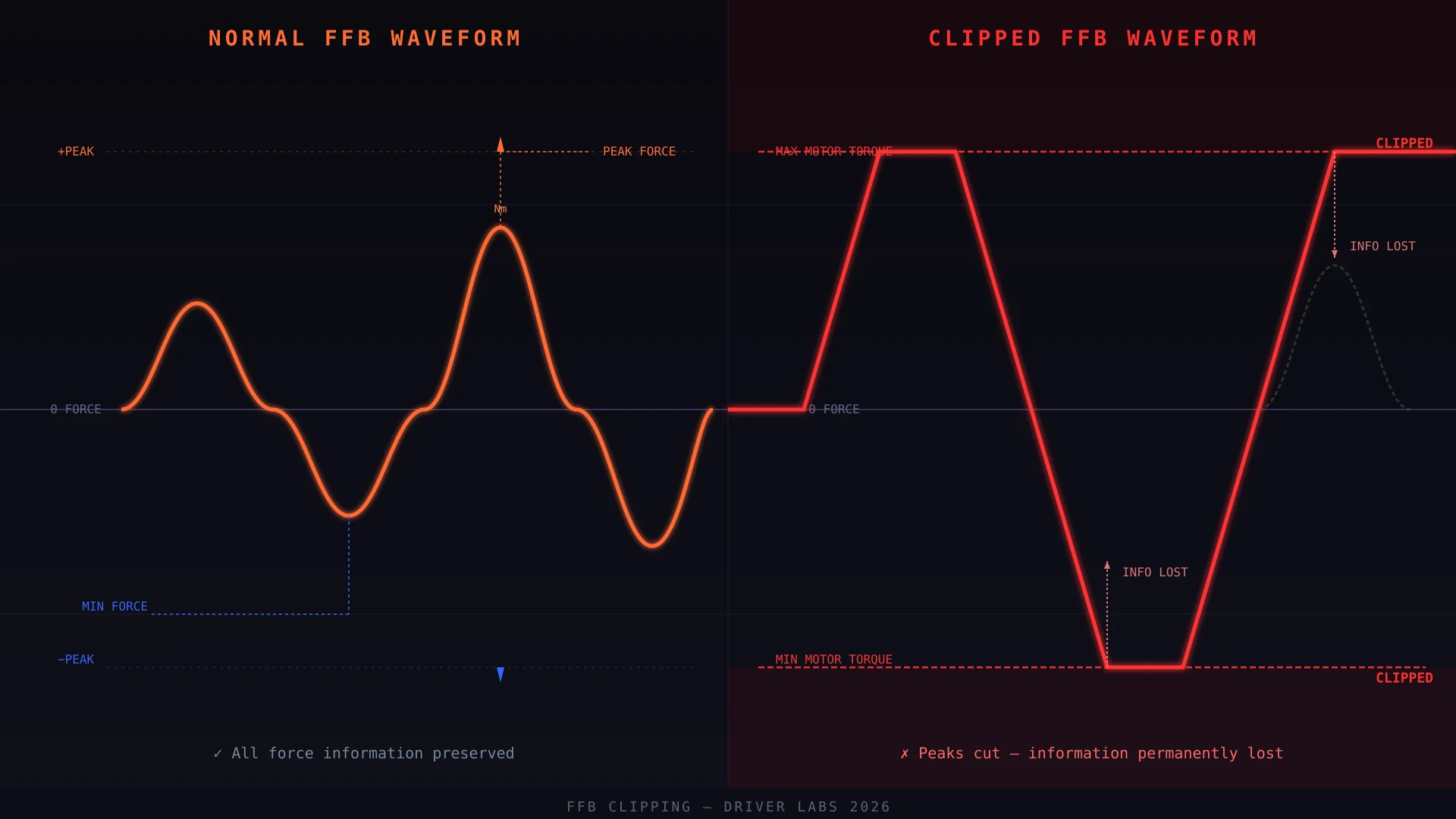
FFB clipping is what happens when the force your sim racing game calculates exceeds what your wheel motor can physically deliver. The peaks get chopped off — and the information those peaks carried disappears entirely.
Think of it like audio clipping on a speaker. When a song gets too loud for the speaker to reproduce, the waveform's peaks get sliced flat. The music still plays — but it sounds distorted, harsh, and loses all the dynamic detail. FFB clipping works the same way, except instead of your ears, it's your hands that stop receiving information.
The physics engine in games like Assetto Corsa Competizione, iRacing, and Automobilista 2 calculates real forces at the tire contact patch. Under braking, corner entry, kerbs, and rear-end slides — these forces spike. If your FFB gain is set too high, those spikes exceed your wheel motor's maximum torque output. The motor can't go stronger than its hardware limit. The signal gets clipped, and your hands feel... nothing.
The cruel irony: most people turn up their FFB gain because they want more road feel. But cranking the gain past the clipping point does the opposite — it removes the very information they're chasing. You're essentially erasing the feedback you want while keeping the feedback you don't need.
2. How to Recognize FFB Clipping
FFB clipping manifests in very specific ways. If you've been struggling with your wheel feel and can't figure out why, look for these symptoms:
- The wheel feels weak or "flat" at speed — You set up a nice strong FFB feel in the pits, then after a few fast laps the wheel feels dead. Like the strength vanished.
- Front-end grip feels inconsistent — You can't tell when you're about to lose the front end. The wheel goes quiet right before it snaps, instead of communicating the load building up.
- Braking feel is vague — ABS activation is the highest-force FFB event in most sims. If your gain is too high, you feel a flat buzz instead of the sharp pulsing cadence of each wheel locking and releasing.
- The wheel feels smoother in slow corners than fast ones — This is backwards from how a real car feels. In a real car, high-g corners generate more steering load. If your wheel gets lighter as speed increases, clipping is eating your high-force signals.
- Kerbs feel muted or invisible — Hitting a kerb generates a sudden sharp spike in FFB. If that spike exceeds your clipping threshold, you feel nothing.
The free-spin test: With the game running and FFB active, quickly turn the wheel as hard and fast as you can by hand. If you feel a distinct "wall" — like the wheel suddenly resists much more than it did during normal driving — your FFB is hitting its peak output. That's a sign you're close to clipping under normal forces.
3. Why It Happens
FFB clipping isn't a bug — it's a symptom of a mismatch between your game's force output and your wheel motor's capacity. Here's the breakdown:
Gain Set Too High
The most common cause. In sim games, the Gain parameter is a multiplier applied to all physics-based FFB forces. Cranking it above 70-80% on a direct drive wheel — especially 10Nm+ bases — almost guarantees clipping during peak events (hard braking, kerbs, aggressive slides).
Game vs. Wheel Base Force Mismatch
Games like ACC and iRacing generate forces based on real-world physics. A GT3 car in ACC can produce FFB forces that exceed what a 10Nm wheel motor can reproduce at gain values above 60-70%. Meanwhile, a lower-quality gear-driven or belt wheel with less peak torque may clip at much lower gain settings. Understanding your wheel's torque ceiling is essential.
Per-Car Peak Forces Not Calibrated
Different cars generate different peak FFB forces. A heavy GT2 car with stiff suspension spikes differently than a lightweight Super Trofeo car. Many sim racers set one global gain and leave it — without accounting for per-car force differences. A car that clips in your current settings might be perfectly dialed in after a small adjustment.
Firmware or Software Updates Change the Math
After a game patch or firmware update, FFB force curves sometimes change. A setting that worked before suddenly feels different — often because the physics engine now generates higher peak forces. This is one of the most common reasons people think their wheel "broke" after a game update.
4. How to Fix It — Game-Side Settings
Before touching your wheel base software, always address the game-side settings first. This is where the majority of FFB clipping problems originate, and it's the easiest place to fix them.
Reduce the Global Gain
This is the primary fix. Reduce your in-game FFB gain by 5-10% increments. Drive a few laps after each adjustment. You're looking for the highest gain value that doesn't clip during peak events.
As a general starting point:
- DD wheels 10Nm+ (Fanatec DD Pro, Moza R12, Simagic Alpha Mini): Start at 50-55% gain in ACC, 60-65% in iRacing
- DD wheels 5-10Nm (Moza R9, Fanatec CSL DD 8Nm): Start at 55-65% gain in ACC, 65-70% in iRacing
- Belt wheels (Thrustmaster T300, Logitech G Pro): Start at 70-80% gain — these have lower peak torque, so clipping is less common
Adjust Torque Multiplier (Per-Car)
Games like ACC allow per-car torque multipliers. If certain cars clip badly while others feel fine, you don't need to lower your global gain — you can lower the per-car multiplier for the specific car causing problems. This is a more surgical approach that keeps your overall FFB strength where you want it.
Use the Reduce Torque Setting (ACC)
ACC has an in-game setting called "Reduce torque when losing grip." At moderate values (10-30%), this scales down FFB forces during rear slides — which also reduces peak forces during the events most likely to clip. Advanced drivers typically set this to 0%, but if you're fighting clipping, 15-20% is a reasonable compromise.
5. Wheel Base FFB Adjustments
Your wheel base software (Pinya App for Moza, FanaLab for Fanatec, Simagic Hub, Simucube Zone) has its own FFB filters and gain controls. Here's how to use them correctly:
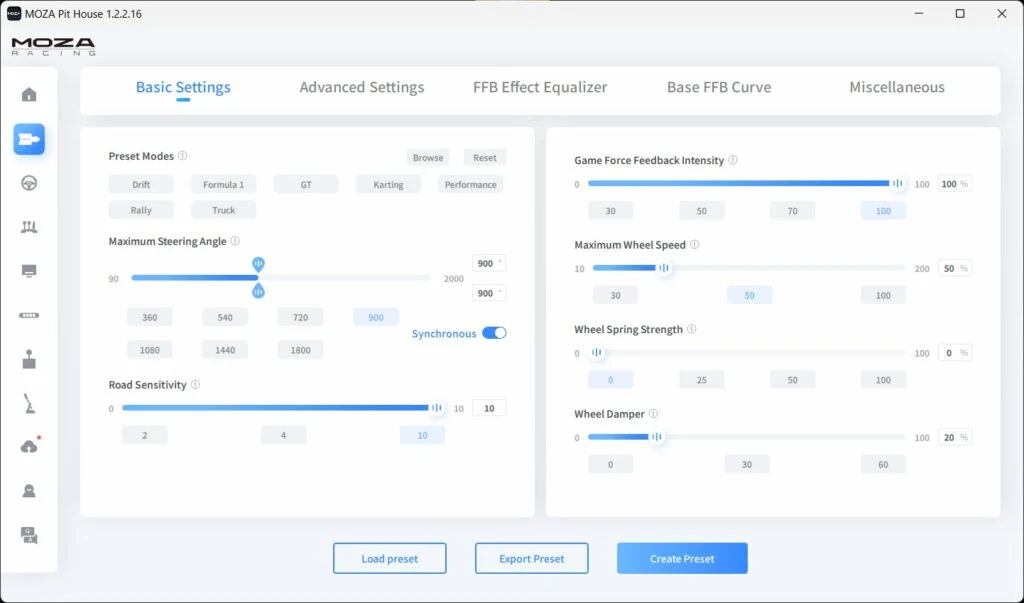
- Set base FFB intensity to 100% — Let the game control the forces. This gives you the cleanest signal path.
- Leave friction and damping at low values — High friction or damping settings can artificially inflate the force output at low speeds, changing the character of the FFB without adding information.
- Check for "Game Volume" settings — Some base software has a game-specific volume knob. Keep this at default unless you have a specific reason to change it.
- Use base software for rotation angle calibration — Setting the correct degrees of rotation (900°, 1080°, etc.) is critical. An incorrect rotation setting means the FFB force curve doesn't match your actual wheel travel.
6. Per-Game Settings: ACC, iRacing, AMS2, RF2
Each sim handles FFB differently. Here's a quick reference for the most popular titles:
| Game | Key FFB Parameter | Recommended Range | Notes |
|---|---|---|---|
| Assetto Corsa Competizione | Gain | 50-65% (DD 10Nm+) | Uses additive force model. Per-car torque multipliers help a lot. |
| iRacing | Force Feedback | 60-75% (DD 10Nm+) | iRacing's FFB is generally stronger. Uses damped spring model. |
| Automobilista 2 | FFB Multiplier | 1.0-1.3 | Similar physics model to ACC. Peak forces vary by car class. |
| rFactor 2 | Steering Torque Scale | 0.85-1.0 | Can generate extreme peak forces. Start conservative. |
| Automobilista / AC | FFB Gain | 0.8-1.0 | Original AC FFB model is different from ACC. Test per car. |
Assetto Corsa Competizione (ACC)
ACC uses an additive force model where forces from front and rear tires stack. This makes peak forces higher than games that average or scale differently. The recommended approach for ACC:
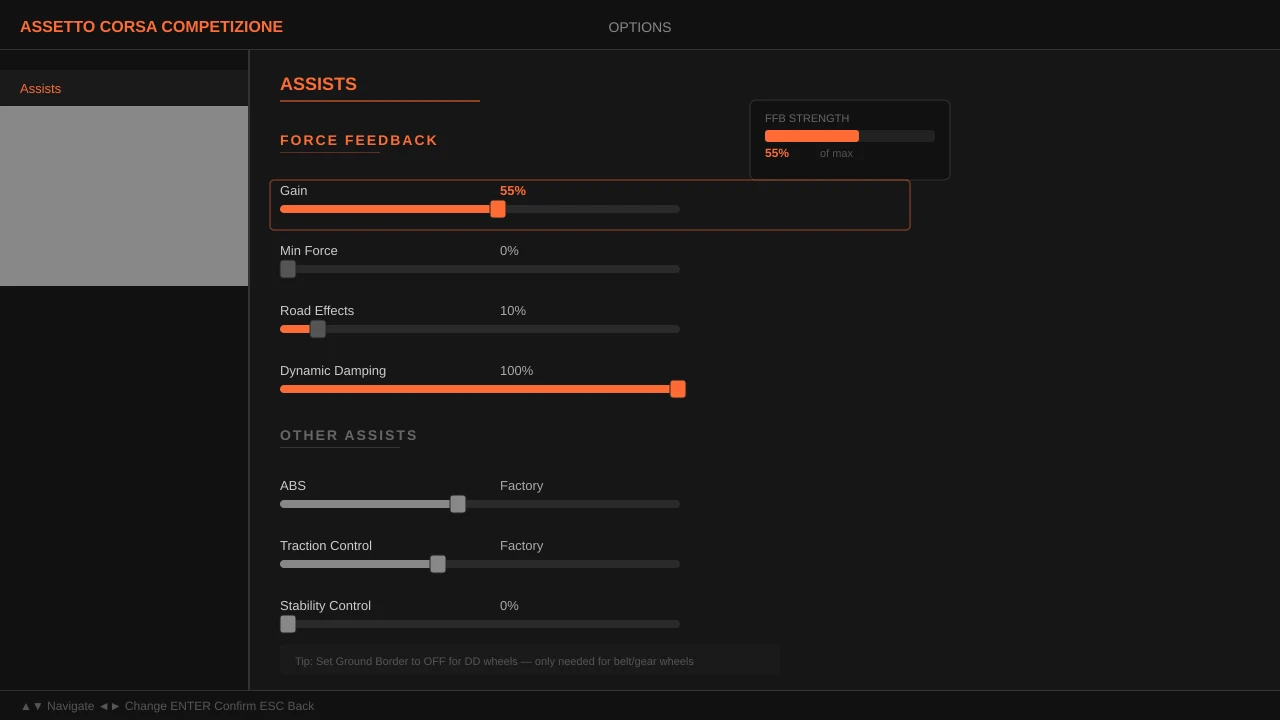
- Start with global gain at 55%
- Adjust per-car torque multiplier for cars that feel too strong or too weak
- ABS Volume at 80-100% — this is a critical safety feedback signal and shouldn't be reduced to fix clipping
- Ground Border at 80-100%
iRacing
iRacing's FFB model uses a damped spring approach that feels different from ACC. Peak forces are generally consistent across car classes, making global gain a more reliable setting. However, iRacing also has higher baseline forces — meaning you may need higher gain percentages to achieve the same perceived strength as ACC.
- Start at Force Feedback 65%
- Enable "Provide Softness Effects" for more road texture
- Dampening at 0-15% — iRacing can feel "nervous" without some damping
7. How to Diagnose with the FFB Test
Most modern sims include an FFB test or force test mode. Use it. This is your most powerful diagnostic tool.
Run the Test
Enter the game's FFB test mode. Most tests cycle through braking, cornering, kerbs, and slides to stress-test your FFB system.
Watch for Flat Peaks
If your wheel suddenly hits a hard wall of resistance during a test event — that's clipping. The signal has maxed out at your motor's physical limit.
Lower Gain by 5%
Drop your gain setting by 5% and re-run the test. Repeat until the peaks feel smooth and dynamic — no harsh walls of resistance.
The goal is to find the highest gain value where no clipping occurs during the test. Then confirm by driving 3-5 laps at race pace. If the test feels smooth but the wheel clips under real driving forces, increase the gain in smaller increments until you find the ceiling.
Don't rely only on the FFB test. Some games' FFB test sequences don't replicate real-world peak forces accurately. A car sliding at the limit on a kerb can generate forces higher than the test sequence. Always confirm your settings with actual driving at race pace.
8. Common Mistakes That Make It Worse
- Turning gain up instead of down when the wheel feels weak — This is the #1 mistake. Weak feel at speed is almost always clipping. Adding more gain makes it worse.
- Maxing out damper to "smooth out" the wheel — High damper adds artificial resistance proportional to rotation speed. It masks clipping rather than fixing it, and it kills your road feel. If the wheel feels harsh at speed, lower the gain — don't add damping.
- Blaming the hardware — "My wheel isn't strong enough for this game." Almost never true with DD wheels 8Nm and above. The problem is almost always gain, not hardware.
- Not re-testing after game patches — A game update can change FFB force curves. When your wheel starts feeling different after a patch, FFB clipping is the first thing to check.
- Copying someone else's gain number without context — A gain of 60% on a Moza R12 feels different from 60% on a Fanatec CSL DD. Torque, force curve, and game integration all vary. Use other people's settings as starting points, not destinations.
"The goal of FFB isn't maximum strength — it's maximum information transfer. A wheel that hits a flat wall at maximum force tells you nothing. A wheel that smoothly varies across its entire range tells you everything about what the car is doing." — Driver Labs
9. Quick Reference Table
| Symptom | Likely Cause | Fix |
|---|---|---|
| Wheel feels flat at speed | FFB clipping | Reduce gain 5-10% |
| Can't feel ABS pulsing | Gain too high, signal clipped | Reduce gain; don't lower ABS volume |
| Wheel feels "mushy" | Too much damping OR clipping | Check damping first; if low, reduce gain |
| Different cars clip differently | Per-car force differences | Use per-car torque multiplier (ACC) |
| Feels weak after game update | FFB force curves changed | Re-run FFB test; re-calibrate gain |
| Kerbs feel invisible | Kerb spikes clipping | Reduce gain 5%; check ground border |
The Bottom Line
FFB clipping is one of the most common — and most misunderstood — problems in sim racing. The fix is almost always the same: reduce your gain. It feels counterintuitive because we associate "more force" with "more feedback." But force feedback clipping works in reverse — past a certain point, adding gain removes information instead of adding it.
Run the FFB test in your game. Find your clipping threshold. Back off 5% from that point. Drive it. You'll immediately notice more communication through the wheel — and that's what actually makes you faster.